
Agleader GO
AGLGO01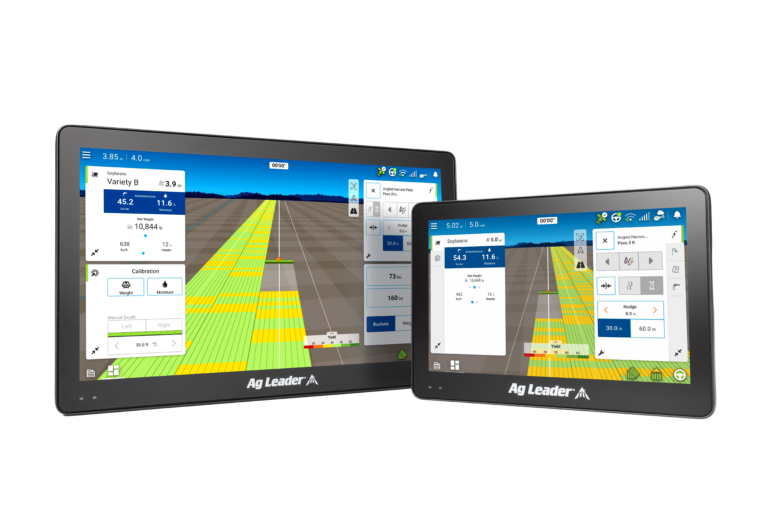
Year-round functionality
From planting through harvest and every field activity in between including guidance.
More map
Larger viewing area allows for all information to be visible from the map screen without the need to switch between screens.
Dynamic tiles
Access all essential tools and information effortlessly. Expand or collapse tiles to customize your view, with automatic map re-centering.
Easy connectivity
Easily connect and sync your maps and information across all your displays and devices with built-in Wi-Fi or new, ruggedized cell modem.
High-resolution data
Clearly see real-time information from your field operation in the monitoring tile without leaving the map screen.
Map options
Utilize the legend to see various real-time, row-level performance maps and easily overlay additional maps to access historical data like variety or prescription layers for on-the-go analysis.
Enhanced diagnostics
View all your connected devices, GPS settings, and diagnostics in an always accessible and easy to navigate menu.
Always accessible guidance and steering
Your steering controls, vehicle icon, and guidance line are always visible in any chosen view without losing sight of the map screen and your application information.
ISOBUS compatible
InCommand Go displays act as both a Universal Terminal and Task Controller:
Universal Terminal – allows users to view and adjust implement settings through a consistent interface.
Task Controller – enables advanced control of rate and section, as well as the mapping and recording of application data for precision ag insights.






 Turboweb